Skill Registry
The Skill Registry is where you author and publish the tower's standard-skills catalog. Published skills are pushed to enrolled SLAW instances on their next sync heartbeat, where they are installed into squad skill libraries.
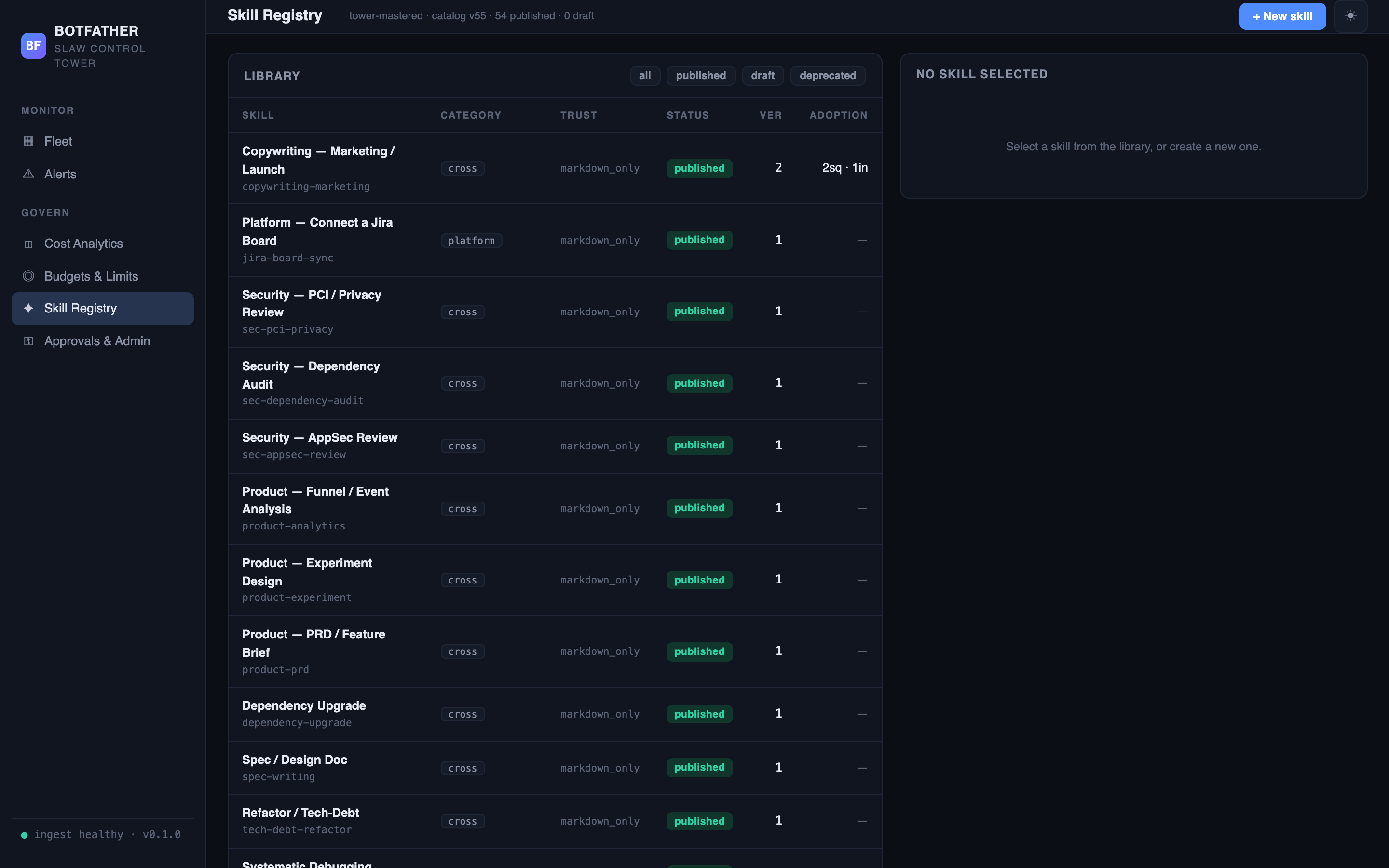
- Botfather running. Skills can be created before any instance is enrolled.
How skills flow from tower to instance
Tower Skill Registry
  └── draft → publish (bumps catalog version)
        └── SLAW instance syncs (acknowledges catalog version)
              └── skills installed into squad libraries on the instance
When you publish a skill, the tower's catalog version increments. On the next sync heartbeat from each enrolled instance, Botfather includes the updated skill descriptors in the response. SLAW installs them into the squad's skill library. Installed copies are not uninstalled if you later deprecate the skill — deprecation removes the skill from the catalog for new installs only.
Standard skills catalog
Botfather ships with a starter catalog of enterprise e-commerce engineering skills, auto-seeded on first boot. These skills are organised on two axes:
| Axis | Values |
|---|---|
| Layer | storefront-web, mobile-ios, mobile-android, bff, graphql, platform, cross |
| Discipline | engineering, design, content, qa, devops, product, security, data |
Each skill is a delegatable, task-level unit of work: it carries a name, a description, a category (derived from layer), trust level, and a markdown body with intent, inputs, steps, deliverable, and done criteria.
The seeded catalog appears with status published on first boot. You can edit, extend, deprecate, or add your own skills alongside the standard set.
Library table
The library table lists all skills in the registry. Filter by status using the tabs above the table.
| Column | What it shows |
|---|---|
| Skill | Name and key (the stable, URL-safe identifier — cannot be changed after creation). |
| Category | The layer category tag. |
| Trust | markdown_only (instructions delivered as text) or trusted (future runnable payload). |
| Status | draft, published, or deprecated. |
| Ver | Version number — increments each time the skill is published with changed content. |
| Adoption | Number of squads and instances with this skill installed, shown as e.g. 4sq · 2in. |
Skill lifecycle
Create a draft
- Click + New skill.
- Fill in the Key (stable identifier — leave blank to derive from the name; cannot be changed later), Name, Category, Trust level, Description, and Skill body (markdown).
- Click Create draft.
The skill is saved with status draft and is visible in the library but not yet pushed to instances.
Publish
- Select the draft in the library table.
- Click Publish.
Publishing bumps the catalog version and marks the skill published. A confirmation message shows the new version number and notes that instances with the skill installed will refresh on their next sync. If the content hasn't changed since the last publish, the response is: "Already up to date — no content change to publish."
Edit and re-publish
- Select a published skill.
- Edit the fields.
- Click Save draft to save without pushing, or Re-publish to bump the version and push the changes to instances.
Deprecate
- Select a published skill.
- Click Deprecate.
Deprecation removes the skill from the catalog — new installs and syncs will no longer receive it. Confirmation: "Deprecated — removed from the catalog. Already-installed copies are not uninstalled." Already-installed copies remain on instances until an Operator removes them locally.
Skill trust levels
| Trust level | Meaning |
|---|---|
markdown_only | The skill body is markdown instructions delivered as text. Agents read and follow them; no execution payload. |
trusted | Reserved for future runnable skill payloads. |
Most skills use markdown_only. Use trusted only when the skill carries executable content that agents are explicitly permitted to run.
Monitoring catalog adoption
The Adoption column in the library table shows how many squads and instances have installed each skill. An instance that has not yet synced the latest catalog version triggers a skill catalog drift alert.
Verification
Confirm a published skill reached your instances:
- The skill shows
published. In the library table, its Status is published and the Ver column shows the new version number (publishing unchanged content returns "Already up to date" and does not bump the version). - Instances pick it up on their next sync. Propagation is not instant — it rides the sync heartbeat. After a cycle, the Adoption column increments (e.g.
4sq · 2in) as instances install the skill into their squad libraries. - No drift alert remains. An instance still on an older catalog version raises a skill catalog drift alert. Once every enrolled instance has synced the current version, that alert clears. To confirm on a specific instance, check its installed skills in Instance Detail.
Next steps
- Instance Detail — view installed skills and their source on a specific instance.
- Alerts — skill catalog drift alerts fire when instances lag behind the current catalog version.
- SLAW skills — how squad skills work on the SLAW side.